Wednesday, December 22, 2021

Why GDBM?

https://helpful.knobs-dials.com/index.php/File_database_notes


Simple file database


l   Concurrent write access for multiple processes


Simple file databases are useful to persist data with little required structure, and for goals that require storing (large amounts of) data on disk with pretty quick hash-based lookups.

Many such databases are based directly or less directly on the old, simple, yet effective dbm, a (family of) database engine(s) that stores key-value mappings (both strings) in a file (sometimes two, splitting out some metadata/index(verify)).

Implementations usually hashing for fast retrieval, allows rebucketing to have the hashing scale well, and fixed-size buckets to allow relatively efficient modification.


https://edoras.sdsu.edu/doc/gdbm/

有優缺點的分析。

Thus gdbm is an excellent lightweight alternative to a full relational database. If all you need to do is to store arbitrary data to be looked up with keys, and do it fast, then gdbm is your solution. However, there are a few caveats.


gdbm_fetch()

需要注意的地方!要記得釋放記憶體。

When gdbm fetches a datum from a file, it mallocs the buffer for you and returns the datum -- but that means, of course, that you have to free the buffer yourself! Failure to do so, as always, will work fine until you go into production and everybody's watching, at which point your process will crash and burn from the memory leaks.

https://edoras.sdsu.edu/doc/gdbm/example.html 

Tuesday, February 26, 2013

Bring CAN bus up - TI am335

#1. Create a file, rc.local @ etc/init.d
#2. Create a symbolic link, S99rc.local @ etc/rc5.d, which links to rc.local

# Content of rc.local

ip link set can0 type can bitrate 250000 triple-sampling on
ip link set can0 up


Monday, January 7, 2013

Workaround: NTP behind proxy


#!/bin/bash

PATH="https://ntp-a1.nict.go.jp/cgi-bin/time"
echo Get date from "$PATH"

# Shell will execute /usr/bin/curl $PATH,
# then printed by echo
NOW="`/usr/bin/curl $PATH`"
echo $NOW

# Update system date time
/usr/bin/sudo date --set="$NOW"

Wednesday, July 13, 2011

Emacs on Cygwin

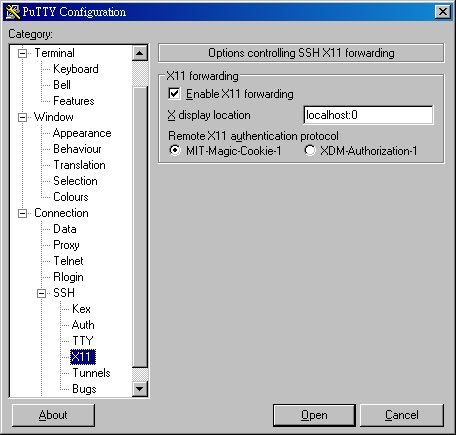
Install Cygwin/X
1. Install Cygwin/X, X Windows on Windows , remember to select packages, like, emacs
2. Add below script to C:\cygwin\home\user\.bashrc
export DISPLAY=:0.0

2. Start XWin Server
3. Type command on shell to start Emacs
$ emacs


Install color-theme for emacs
1. Download , file: color-theme-6.6.0.zip
2. Extract color-theme-6.6.0.zip to C:\cygwin\home\user\.emacs.d
3. Create file, C:\cygwin\home\user\.emacs
4. Add below script to file, .emacs

(add-to-list 'load-path "~/.emacs.d/color-theme-6.6.0/")


Change Emacs theme
1. Open Emacs on Cygwin (Turn on X Server and type: emacs)
2. Type: 'M-x load-library'; then type: 'color-theme'
3. Type: 'M-x color-theme-select'


Set user's default theme
Put below scripts to file .emacs
 (require 'color-theme)  (color-theme-initialize)  (color-theme-robin-hood)
Last script 'robin-hood' is the name of theme


Check load-path
'C-h v load-path RET'

Reference

Monday, April 18, 2011

menuconfig

Add an entry to kernel config menu
** make sure library has been installed, "ncurses-devel"

/kernel source$ make clean
/kernel source$ make menuconfig

Friday, April 15, 2011

Change emacs theme

M-x load-library
color-theme
M-x color-theme-select

After you've selected a theme on the list then press ENTER

P.S. Place color-theme folder to ~/.emacs.d

Sunday, April 3, 2011

Tags with Emacs

For emacs you can't use the file, which is generated by ctags. You should use etags.

$ find -E . -iregex '.*\.(cpp|[ch])$' | etags -

Inside Emacs

M-x visit-tags-table <RET> FILE <RET>
M-. Find the first definition of TAG
M-* Pop back
C-u M-. Find the next definition


Reference:

Synopsis:

Saturday, March 5, 2011

Search string in multiple files

$ find -E ./ -iregex '.*\.(cpp|h)$' | xargs grep -Ei 'string'

Replace string in multiple files

$ find -E ./ -iregex '.*menu_.*\.(cpp|h)$' | xargs sed -E -i~ 's/ORG/NEW/g'

Multiple file name change

$ find -E ./ -iregex '.*menu_.*\.(cpp|h)$' > file.list
$ perl -w rename.pl file.list

-----------------------------------------
while($line = <>) {
if($line =~ m/.*(\bMenu_Setting.*)/i) {
# print "$1\n";
$old = $line;
$old =~ s/^\./\/home\/max\/src\/csu502 can\/acu-stm32-lcd/;
$old =~ s/\n//;
print "$old\n";
$newname = $old;
# replace file name
$newname =~ s/Menu_Setting_//;
print "$newname\n\n";
# use shell command: mv
system("mv", "$old", "$newname");
}
}

Tuesday, November 9, 2010

CSTACK & FreeRTOS

FreeRTOS V6.1.0
MCU: ARM Cortex-M3
Compiler: IAR 5.3

修改CSTACK的大小會當機!
如果當機的話,可以修改port.c.
---------------------------------------------------------------
portSTACK_TYPE *pxPortInitialiseStack( portSTACK_TYPE *pxTopOfStack, pdTASK_CODE pxCode, void *pvParameters )
{
/* Simulate the stack frame as it would be created by a context switch
interrupt. */
   pxTopOfStack--; /* 將該行移除或加回,就可解決當機的問題 */
....
....
---------------------------------------------------------------

針對不同的CSTACK size, linker會把CSTACK排在不同的地方;可能是RAM的開頭或尾巴。

Friday, October 22, 2010

Test CAN-USB/2

Start-up device
% cd ../can-usb2/SocketCAN/ntcanSckPlugin32-1.0.3-2.0.3-ntcan-3.3.0/iproute2/iproute2-2.6.31/ip
% ./ip link set can0 up type can bitrate 25000

Stop device
% ./ip link set can0 down


Reference: ..\can-usb2\SocketCAN\ntcanSckPlugin32-1.0.3-2.0.3-ntcan-3.3.0\doc
Files: CAN-API_Part1_Function_Manual.pdf, page 90
Before starting the test, the start-up process isn't necessary.


Test: Show device info
% cd ../can-usb2/SocketCAN/ntcanSckPlugin32-1.0.3-2.0.3-ntcan-3.3.0/cantest
% ./cantest
CAN Test Rev 2.9.11  -- (c) 1997-2010 esd electronic system design gmbh

Available CAN-Devices:
Net  60: ID=SocketCAN Dll=3.3.00 Driver=2.0.03 Firmware=1.0.06 S/N=GF000754
         Hardware=1.0.00 Baudrate=00000004 Status=00000000 Features=0022
         Timestamp=000493334fa504c2 TimestampFreq=1000000 Hz

Syntax: cantest test-Nr [net id-1st id-last count
        txbuf rxbuf txtout rxtout baud testcount data0 data1 ...]
Test  0:  canSend()
Test  1:  canWrite()
Test 51:  canWrite() with incrementing ids
Test  2:  canTake()
Test 12:  canTake() with time-measurement for 10000 can-frames
Test 22:  canTakeT()
Test 32:  canTake() in Object-Mode
Test 42:  canTakeT() in Object-Mode
Test  3:  canRead()
Test 13:  canRead() with time-measurement for 10000 can-frames
Test 23:  canReadT()
Test  4:  canReadEvent()
Test 64:  Retrieve bus statistics (every tx timeout)
Test 74:  Reset bus statistics
Test  5:  canSendEvent()
Test  8:  Create auto RTR object
Test  9:  Wait for RTR reply
Test 19:  Wait for RTR reply without text-output

Comment
Baudrate=00000004, which representing baudrate is 250000bps

Reading Test
% ./cantest 23 60 1 100 20 20 20 20 20 4 50 50 4 22

Comment
test-Nr: 23
net: 60
id-1st: 1
last-id: 100
count: 20
txbuf: 20
rxbuf: 20
txtout: 20
rxtout: 20
baud: 4 (250000bps)
testcount: 22

Write Test
./cantest 51 60 1 100 20 20 20 20 20 4 50 50 4 22

Comment
test-Nr: 51
net: 60
id-1st: 1
last-id: 100
count: 20
txbuf: 20
rxbuf: 20
txtout: 20
rxtout: 20
baud: 4 (250000bps)
testcount: 22


Baudrate table
0: 1000 kbps
E *2) 800 kbps
1: 666.6 kbps
2: 500 kbps
3: 333.3 kbps
4: 250 kbps
5: 166 kbps
6: 125 kbps
7: 100 kbps
10 *2): 83.3 kbps
8: 66.6 kbps
9: 50 kbps
A: 33.3 kbps
B: 20 kbps
C: 12.5 kbps
D: 10 kbps

Thursday, October 14, 2010

CAN-USB/2 start-up process

Reference:
../can-usb2/SocketCAN/socketcan-trunk-r1110/kernel/2.6/Documentation/networking/can.txt 6.5.3

Install SocketCAN plugin
% cd ~max/src/can-usb2/SocketCAN/ntcanSckPlugin32-1.0.3-2.0.3-ntcan-3.3.0/
% make
% ./install.sh
% cd iproute2/iproute2-2.6.31
% make

Start CAN-USB/2
% cd ~max/src/can-usb2/SocketCAN/ntcanSckPlugin32-1.0.3-2.0.3-ntcan-3.3.0/iproute2/iproute2-2.6.31/ip

Start device
% ./ip link set can0 up type can bitrate 250000 

Display device status-1
% ./ip -details -statistics link show can0

Display device status-2
% cd /sys/class/net/can0/statistics


Paths
/sys/class/net/can0

Documents
../can-usb2/SocketCAN/socketcan-trunk-r1110/kernel/2.6/Documentation/networking/can.txt

Device working status
#1
% cd /sys/class/net/can0
% cat operstate
#2
% ../can-usb2/SocketCAN/socketcan-trunk-r1110/test/canecho

Device properties
Reference:../can-usb2/SocketCAN/socketcan-trunk-r1110/kernel/2.6/Documentation/networking/can.txt 
Chapter6
% cd ~max/src/can-usb2/SocketCAN/ntcanSckPlugin32-1.0.3-2.0.3-ntcan-3.3.0/iproute2/iproute2-2.6.31/ip/
% ./ip link set can0 type can tq 16 prop-seg 6 phase-seg1 6 phase-seg2 2 sjw 1
% ./ip link set can0 type can bitrate 250000
% ./ip -details -statistics link show can0
% ./ip -details link show can0

Device operation
Start CAN interface
% ../can-usb2/SocketCAN/socketcan-trunk-r1110/etc/can_if start

Device testing
% ../can-usb2/SocketCAN/ntcanSckPlugin32-1.0.3-2.0.3-ntcan-3.3.0/cantest/cantest
% ../can-usb2/SocketCAN/socketcan-trunk-r1110/can-utils/cangen interface

Programming reference
% ../can-usb2/SocketCAN/ntcanSckPlugin32-1.0.3-2.0.3-ntcan-3.3.0/doc

Wednesday, September 15, 2010

Command-Line Conventions

command的參數傳遞可分為兩種,以 "-" 加上一個單一字母或 "--" 加上一字串。
例如:如下兩個參數對於command來說皆相同。
-h
--help

Monday, September 13, 2010

CAN-USB/2

Driver install (Linux kernel 2.6)
% cd socketcan-trunk-r1110/kernel/2.6
% make
% sudo make modules_install
% sudo /sbin/depmod -a

Check installation
% ls /sys/class/net/

There should be have an entry "can0".

Thursday, September 9, 2010

Socket CAN

Socket CAN uses the Berkeley socket API, the Linux  network stack and implements the CAN device drivers as network interface.
一般皆使用Character-device方式實作CAN driver.
若以Character-device實作CAN device driver,其限制:只有一個Process可以使用;更換不同的CAN Controller時,可能需要動到App。
以Socket CAN的方式操作,同時有多個Process可以存取CAN device,且可以同時Listening相同ID的訊息。以Character-device的方式並非無法達成,只是成品看起來會很醜,而且不好用。
對於Application來說,透過一個已定義好的Abstraction layer存取device。和硬體相關的介面也有定義,所以只要實作這些API即可。

Sunday, August 15, 2010

Return a function pointer

Without a pre-defined function pointer type

float (*GetPtr1(const char opCode))(float, float) {    if(opCode == '+')       return &Plus;    else       return &Minus; // default if invalid operator was passed }

參考來源:

"float (*GetPtr1(const char opCode))(float, float)"
- The Function Pointer Tutorials - Syntax (在「Google 網頁註解」中檢視)

Sunday, October 12, 2008

AD converter: TI ADS1110

AD reference voltage不需由外部提供. 2.048V
Analog input voltage: ±2.048V (V+in - V-in) ( -2.048 ~ +2.048V )
目前的使用方式, V-in直接接地, analog input voltage的範圍: 0 ~ +2.048V
精確度由16-bits降為15-bits.


Sunday, August 3, 2008

Mutex


Priority arrangement
HH: RS485 Rx handler
H: Voltage control
M: Peripheral
L: SMR


void
COMM_Init()
{
Create mutex for RS485 driver.
Create a task, named RS485 Rx Handler.
}


bool
RS485_TxHandler(byte *pPacket, bool waitSlave, portTypeTick delay )
{
if ( mutex is not available )
{
delay;
if ( mutex is still not available ) return false;
}

if ( waitSlave ) resume task, RS485 Rx Handler.
......
.....
other codes.
....

release the mutex.
}


void
Task_RS485_RxHandler
()
{
byte c;
Suspend itselt;

for(;;)
{
Delay 5ms.
while( RS485_GetByte( &c, delay_2ms ) )
{
if ( Get a legal RS485 Packet ) {
Signal semaphore, SEM_RS485_Arrive_Packet;
break;
}
}
Suspend itself.
}
}


Binary Semaphore : 用於Task之間的同步
Mutex : (MUTual EXclusion semaphores), are used by tasks to gain exclusive access to resources. A mutex is used by App to reduce the priority inversion problem.